How to Get a Virtual Assistant to Master Your Inbox

The ping of a new email notification. It’s a sound that strikes both excitement and dread into the hearts of busy professionals, entrepreneurs, and sales and marketing teams everywhere. In today's hyper-connected world, our inboxes have become the central hub for communication, collaboration, and critical information. Yet, for many, this hub has transformed into a chaotic vortex, demanding hours of attention each day and pulling focus away from core business objectives. The sheer volume of messages can be overwhelming, leading to missed opportunities, delayed responses, and a pervasive sense of being constantly behind. If you're drowning in emails and struggling to keep your head above water, there’s a powerful, proven solution: it's time to get a virtual assistant.
Delegating your inbox management to a skilled virtual assistant (VA) isn't just about offloading tasks; it's a strategic move to reclaim your most valuable asset—time. A VA can transform your inbox from a source of stress into a well-oiled machine, ensuring you never miss an important message and can focus on what truly drives your business forward. This comprehensive guide will walk you through the entire process, from identifying what to delegate to finding the perfect VA and integrating them seamlessly into your workflow for maximum email productivity.
What Email Tasks Can a Virtual Assistant Handle?
The first step in leveraging a VA for your inbox is understanding the scope of what can be effectively managed. Many professionals underestimate the breadth of tasks that can be delegated. A proficient virtual assistant for email can handle a significant portion of your daily email traffic, freeing you from the mundane and allowing you to focus on high-level strategy and decision-making. Here are key areas where a VA can provide immense value:
-
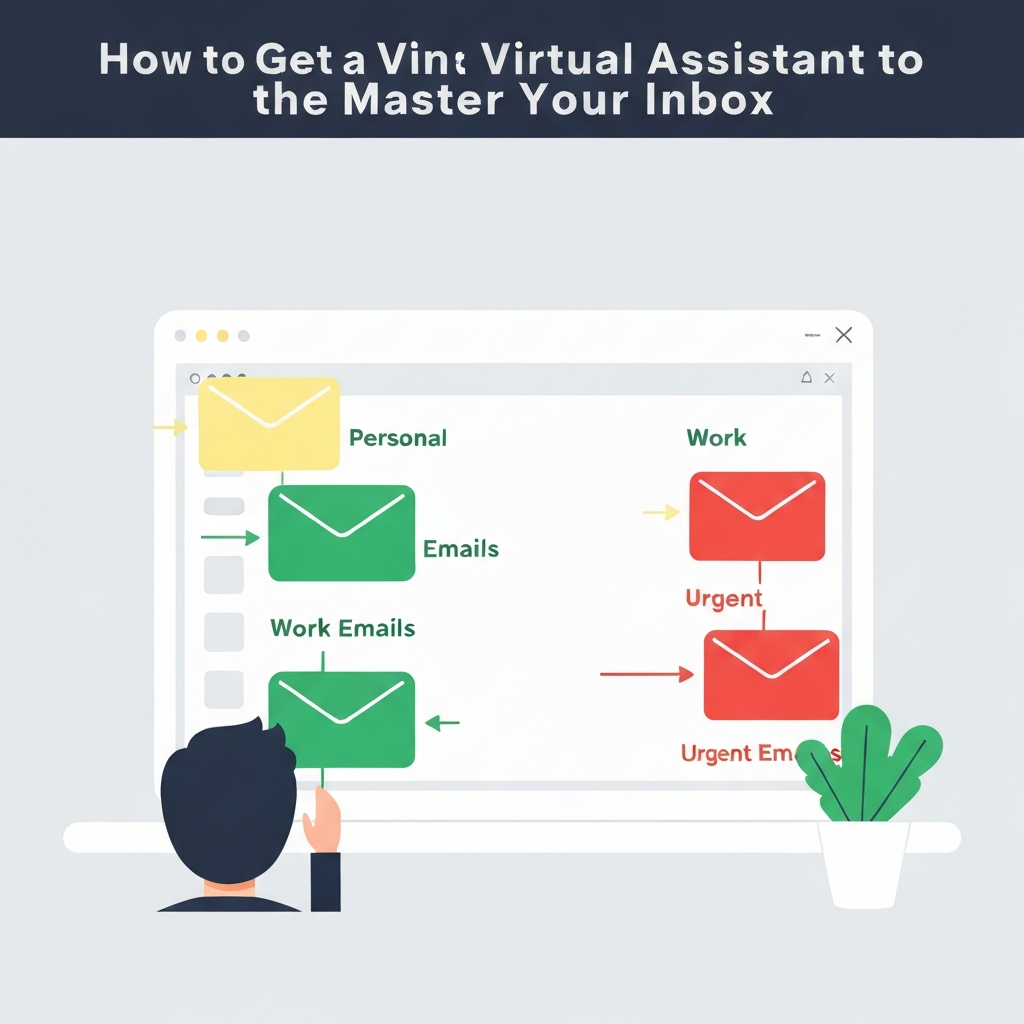
Triage and Filtering
This is perhaps the most critical function. A VA can sort through incoming emails, categorizing them by sender, urgency, or topic. They can flag messages that require your immediate attention, archive non-essential communications, and delete spam. This ensures that when you check your inbox, you're only seeing what truly matters.
-
Responding to Routine Inquiries
Many emails fall into predictable patterns. VAs can be trained to answer frequently asked questions (FAQs), confirm appointments, acknowledge receipt of documents, or provide standard information. This drastically reduces the number of emails you need to personally address.
-
Drafting Responses: For more complex emails that require a thoughtful reply but not necessarily your direct input, a VA can draft responses based on your provided guidelines, templates, or previous communications. You can then review and send, saving significant drafting time.
-
Scheduling and Calendar Management
Coordinating meetings is a notorious time sink. A VA can liaunt with clients, colleagues, or partners to find suitable meeting times, send out calendar invitations, manage RSVPs, and send reminders. This integration is vital for maintaining smooth operations.
For example, a VA can manage your calendar by checking for conflicts, proposing new times, and sending out Zoom or meeting room links, all without you needing to lift a finger. This is a core part of what a VA for administrative tasks excels at.
-
Unsubscribing and List Management
Are you bombarded with newsletters and promotional emails you never read? A VA can systematically unsubscribe you from unwanted lists, helping to declutter your inbox and reduce noise.
-
Follow-Ups
A VA can track emails you've sent that require a response and send polite follow-up messages on your behalf. This is invaluable for sales teams chasing leads or project managers ensuring tasks are completed on time.
-
Information Gathering
If an email requires context or research before responding, a VA can gather the necessary information, saving you the time spent digging through files or searching online.
-
Outbound Communication
With clear direction, a VA can send out mass emails, such as newsletters, company announcements, or marketing campaigns. This allows for consistent communication without consuming your personal time. This is a prime example of how you can outsource email tasks effectively.
By delegating these tasks, you're not just clearing your inbox; you're optimizing your communication flow. This proactive approach can significantly improve how you manage your digital correspondence. If you're looking for the right tools to support this, understanding which business email client your VA will be using or how to best organize it can be a great starting point.
Finding and Vetting the Right Virtual Assistant for Your Needs
The decision to hire a virtual assistant is a significant one. To ensure success, it’s crucial to find someone who not only possesses the necessary skills but also aligns with your professional style and needs. The market for virtual assistants is vast, ranging from freelance platforms to specialized agencies offering dedicated email management services.
Where to Look for a Virtual Assistant
- Freelance Platforms: Websites like Upwork, Fiverr, and Toptal host a wide array of VAs with varying experience levels and pricing. These platforms allow you to post jobs, review profiles, and communicate directly.
- Specialized VA Agencies: Companies like Delegated, Wishup, and InboxDone.com focus specifically on providing virtual assistants, often with a rigorous vetting process and dedicated account managers. These services can be more expensive but often offer higher reliability and specialized training.
- Referrals: Ask colleagues, mentors, or business contacts if they can recommend a VA they've had positive experiences with. Personal referrals can often lead to the most compatible matches.
What to Look For in an Email Management VA
- Experience: Look for VAs who explicitly mention email management, inbox organization, or executive administrative support as part of their services.
- Communication Skills: They should be articulate, responsive, and able to understand your instructions clearly.
- Attention to Detail: Essential for avoiding errors in drafting, scheduling, or categorizing emails.
- Reliability and Professionalism: You need someone you can trust with access to your communications.
- Tech Savvy: Familiarity with common email platforms (Gmail, Outlook, etc.), calendar tools, and potentially CRM systems.
The Vetting Process
- Review Profiles and Portfolios: Look for relevant experience, testimonials, and skills.
- Conduct Interviews: Prepare a list of questions. Ask about their approach to handling high-volume inboxes, how they prioritize tasks, their experience with different email clients, and how they handle sensitive information. For instance, ask: "How would you prioritize these three emails: a client inquiry, a newsletter, and an internal team update?"
- Check References: If possible, speak to previous clients to get an unbiased perspective on their performance.
- Consider a Paid Trial: Many agencies and freelancers offer a trial period or a small project. This is an excellent way to test their skills, communication style, and reliability before committing long-term. Agencies like Wishup highlight their ability to handle a wide range of email tasks, making them a good option to explore. Similarly, Delegated offers specific services for email management.
Choosing the right VA is an investment in your productivity. A well-vetted VA from a service like InboxDone.com can be trained to understand your unique needs and preferences.
Setting Clear Expectations and Communication Protocols
Once you've found a promising candidate, the next critical step is establishing clear expectations and communication protocols. This phase is paramount to a successful partnership and preventing misunderstandings. A VA can only be as effective as the instructions they receive.
Defining "Done" for Your Inbox
What does an inbox managed by your VA look like? Is it zero unread emails? Are all emails categorized? Are all urgent messages flagged? Be specific. For example, "My goal is to have no emails older than 24 hours in my primary inbox, with all client-related inquiries flagged and all newsletters archived."
Prioritization Guidelines
Train your VA on how to identify and prioritize emails. This could involve:
- Sender importance (e.g., VIP clients, direct reports).
- Keywords in the subject line or body (e.g., "URGENT," "Action Required").
- Specific email addresses or domains.
- Categorization systems (e.g., "To Action," "For Review," "FYI").
Response Time Standards
Establish clear guidelines for how quickly different types of emails should be acknowledged or responded to. For instance:
- Urgent inquiries: Acknowledge within 1 hour, respond within 4 hours.
- Standard client emails: Acknowledge within 4 hours, respond within 24 business hours.
- Internal communications: Respond within 1 business day.
Tone of Voice and Brand Consistency
Your VA will be representing you. Provide clear instructions on the desired tone: formal, informal, friendly, direct, empathetic, etc. Sharing examples of your own emails or providing a style guide can be incredibly helpful. For instance, if you run a creative agency, a more casual and friendly tone might be appropriate, whereas a financial firm would require a more formal approach.
Confidentiality and Security
Your inbox contains sensitive information. Discuss confidentiality agreements, data security best practices, and how your VA will handle confidential client data or proprietary company information. Ensure they understand the importance of secure password management and avoiding phishing attempts.
Communication Channels and Frequency
Determine how you and your VA will communicate. Will it be via Slack, email, a project management tool like Asana or Trello, or regular video calls? Schedule regular check-ins (daily or weekly) to discuss progress, address questions, and provide feedback. This consistent communication loop is vital for refining the VA’s understanding of your needs.
Feedback Loop
Encourage your VA to ask questions and provide feedback on your instructions. Similarly, be prepared to offer constructive criticism and positive reinforcement. This iterative process ensures your VA becomes increasingly adept at managing your inbox according to your preferences.
Onboarding Your Virtual Assistant for Seamless Email Management
Once expectations are set, the onboarding process begins. This is where you equip your VA with the access, tools, and knowledge they need to succeed. A structured onboarding plan ensures a smooth transition and minimizes disruption.
Granting Secure Access
Provide your VA with the necessary login credentials for your email accounts. Use secure password management tools (like LastPass or 1Password) rather than sharing passwords directly. Grant access to any related tools they might need, such as your calendar, CRM, or project management software.
Initial Training and Workflow Demonstration
Walk your VA through your current email system and workflow. This includes:
- Demonstrating your preferred email client (e.g., Gmail for Business, Outlook).
- Showing them how you currently organize emails (folders, labels, stars, flags).
- Providing templates for common responses or explaining where to find them.
- Explaining your contact management system and key stakeholders.
- Demonstrating any specific email productivity tools you use.
Creating Standard Operating Procedures (SOPs)
Document everything. Create a simple "VA Handbook" or a set of Standard Operating Procedures (SOPs) that detail how you want specific tasks handled. This document should cover:
- Your prioritization rules.
- Response time expectations.
- Preferred tone and language.
- Instructions for common scenarios (e.g., handling customer complaints, scheduling a complex meeting).
- Contact information for key people.
This documentation serves as a reference guide for your VA and ensures consistency, especially if you work with multiple VAs or if your primary VA is unavailable.
Shadowing and Gradual Handover
Don't expect your VA to take over everything on day one. Start by having them shadow you or handle a small, defined subset of your inbox. As they demonstrate competence and understanding, gradually increase their responsibilities. This could look like:
- Week 1: VA sorts and flags emails, drafts responses for your review.
- Week 2: VA handles routine responses independently and continues drafting complex ones.
- Week 3 onwards: VA manages the majority of the inbox, escalating only the most complex or strategic issues.
Regular Check-ins and Feedback
Continue with your scheduled check-ins. Use this time to review their work, answer questions, and provide feedback. This iterative process is crucial for refining their performance and ensuring they are meeting your evolving needs. A VA's ability to manage your inbox effectively often depends on continuous guidance.
Measuring the ROI: How a VA Boosts Your Email Productivity
Hiring a virtual assistant for email management is an investment, and like any investment, it's essential to measure its return on investment (ROI). The benefits extend far beyond a tidier inbox; they impact your bottom line and overall well-being.
Quantifiable Time Savings
The most obvious ROI is the amount of time you reclaim. If you spend 3 hours a day managing your inbox, and your VA takes over 80% of that, you're gaining back 2.4 hours per day. That's 12 hours per week, or nearly 50 hours per month. Consider what you could achieve with that extra time: strategic planning, client acquisition, product development, or simply achieving a better work-life balance.
Improved Response Times and Customer Satisfaction
When emails are handled promptly and efficiently, customer satisfaction often increases. Faster responses can lead to quicker deal closures, better client retention, and a stronger professional reputation. This directly impacts your email response ROI.
Reduced Stress and Burnout
The constant pressure of an overflowing inbox can lead to significant stress and burnout. Offloading this burden allows you to focus on tasks you enjoy and are good at, reducing mental fatigue and improving your overall job satisfaction and mental health.
Fewer Missed Opportunities
An unmanaged inbox is a breeding ground for missed opportunities. Important client requests, partnership proposals, or urgent internal messages can easily get buried. A VA ensures that critical communications are flagged and addressed promptly, preventing potential losses.
Key Metrics to Track
- Time Saved: Estimate the hours you've regained by delegating email tasks.
- Response Time Averages: Monitor how quickly emails are being responded to.
- Number of Emails Handled: Track the volume of correspondence managed by the VA.
- Lead Conversion Rates: If applicable, observe if faster follow-ups improve conversion rates.
- Client Feedback: Solicit feedback on response times and communication quality.
By actively tracking these metrics, you can clearly demonstrate the value your VA brings and identify areas for further optimization.
The Synergy of Virtual Assistants and AI Email Tools
The landscape of email management is rapidly evolving, with Artificial Intelligence (AI) playing an increasingly significant role. While a virtual assistant provides invaluable human oversight, communication nuance, and strategic task execution, AI tools can amplify their effectiveness and automate even more of the inbox management process. This creates a powerful hybrid approach to achieving peak email productivity.
AI-powered solutions are adept at handling repetitive, data-driven tasks. They can learn patterns, intelligently categorize messages, detect sentiment, and even draft preliminary responses based on learned data. This frees up your VA to focus on more complex, relationship-building, or strategic communication that requires human judgment and empathy. Think of AI as the ultimate assistant to your assistant.
For instance, tools like an ai executive assistant can help streamline your workflow by intelligently categorizing, prioritizing, and even drafting responses to your emails, allowing your human assistant to focus on higher-value tasks. This technology can analyze incoming messages, identify urgent items, and suggest quick replies, significantly reducing the manual sorting and initial response time for your VA. This synergy means your VA can handle a greater volume of more complex interactions, while the AI ensures the foundational organizational and preliminary communication tasks are handled with speed and accuracy.
When considering how to implement these tools, explore options that offer advanced features. A smart inbox sorter or a sophisticated smart email filter can work in tandem with your VA, ensuring that critical messages never slip through the cracks. Furthermore, AI tools can assist with tasks like summarizing long email threads or even taking notes during email-related discussions, which can be invaluable for your VA to process information efficiently. The integration of an AI note taker can also help streamline the process of extracting action items from email conversations, which your VA can then manage.
The combination of a skilled virtual assistant and advanced AI email tools creates a robust system that not only manages your inbox but actively enhances your communication efficiency and strategic focus.
Conclusion: Reclaiming Your Time and Focus with a VA
The challenge of email overload is a reality for countless professionals, but it doesn't have to be your reality. By strategically deciding to get a virtual assistant, you're not just delegating tasks; you're investing in your productivity, your peace of mind, and your business's growth. We've explored what email tasks a VA can expertly handle, how to find and vet the right professional for your needs, the critical importance of setting clear expectations, and the steps for a seamless onboarding process.
We've also highlighted how to measure the tangible ROI of this partnership, demonstrating how reclaimed time and improved response rates directly benefit your business. Most importantly, we've looked towards the future, emphasizing the powerful synergy between human virtual assistants and AI email tools, creating an unbeatable system for inbox mastery. Tools like an ai executive assistant can further empower this collaboration, automating routine processes and allowing your VA to focus on high-impact communication.
The ultimate goal is to transform your inbox from a source of constant distraction and stress into a streamlined communication channel that supports, rather than hinders, your professional endeavors. By taking the step to hire a virtual assistant for your email management, you empower yourself to focus on strategic thinking, client relationships, and the core activities that drive your success. It’s time to stop letting your inbox dictate your day and start dictating your day to your inbox. Take the first step today and reclaim your time and focus.
```
Frequently Asked Questions
