Best Business Email Client for Productivity & Insights

In today's fast-paced business environment, email remains the cornerstone of professional communication. Yet, the traditional inbox can quickly become a bottleneck, hindering productivity and obscuring valuable insights. The humble email client has evolved dramatically, transforming from a simple messaging tool into a sophisticated platform designed to enhance efficiency, foster collaboration, and even offer strategic intelligence. If you're looking to master your communications, streamline workflows, and gain a competitive edge, choosing the right business email client is paramount. This article will guide you through the essential features, the power of AI, and how to select a client that not only manages your inbox but actively contributes to your business growth.
Key Features for Enhanced Productivity: Beyond Basic Sending and Receiving
A modern business email client is far more than a digital post office. It's an integrated workspace designed to tackle the complexities of modern professional communication. While sending and receiving emails are fundamental, the true power lies in the features that help manage the sheer volume and complexity of modern inboxes. For busy executives, entrepreneurs, and sales professionals, these capabilities are game-changers.
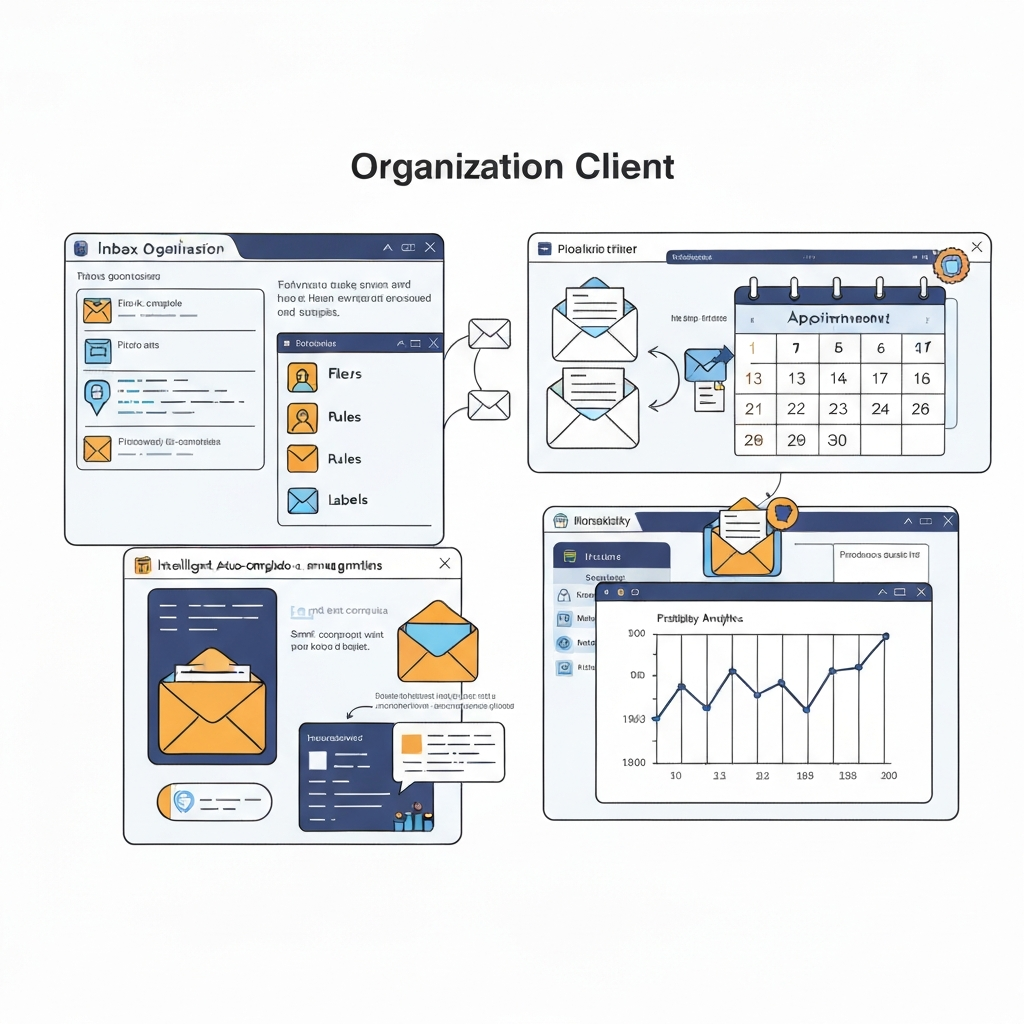
- Advanced Search and Filtering: The ability to quickly locate specific emails, attachments, or contacts is crucial. Robust search functions, often powered by natural language processing, can save hours of sifting through archives. Sophisticated filtering rules allow you to automatically sort incoming mail, prioritizing important messages and decluttering your view. This is the first step towards effective business inbox management.
- Task Management Integration: Many leading clients integrate directly with task management systems or offer built-in to-do lists. You can convert an email into a task, set reminders, and track progress without leaving your inbox. This seamless workflow prevents important action items from falling through the cracks.
- Collaboration Tools: For teams, shared inboxes, team threads, and collaborative note-taking within email threads are invaluable. These features facilitate team communication, reduce internal email chains, and ensure everyone is on the same page regarding client interactions or project updates.
- Customization and Automation: The ability to create email templates for common responses, set up custom rules for message handling, and automate repetitive tasks can significantly boost efficiency. This frees up mental bandwidth for more strategic work.
- Calendar and Contact Integration: Seamless integration with your calendar and contact management system is essential. Scheduling meetings directly from an email, viewing contact history within an email thread, and syncing information across devices ensures consistency and saves time.
- Cross-Device Synchronization: In a world where work happens everywhere, real-time synchronization across desktop, mobile, and web interfaces ensures you always have access to the latest information and can respond promptly, regardless of your location.
Implementing these features transforms your email client from a passive tool into an active productivity hub. For those looking to tame the chaos, exploring solutions like a smart inbox sorter can be a great starting point.
Leveraging AI in Email Clients for Smarter Management and Insights
Artificial Intelligence (AI) is no longer a futuristic concept; it's actively reshaping how we interact with our email. Modern business email client solutions are increasingly embedding AI capabilities to automate tasks, provide deeper insights, and predict user needs. This makes efficient email handling more achievable than ever before.
AI-Powered Automation and Organization
AI excels at repetitive tasks, making it perfect for email management. Features like smart categorization, automatic prioritization, and spam detection are standard. Beyond that, AI can:
- Automate Routine Responses: AI can draft replies to common queries, suggest responses based on email content, or even schedule follow-ups automatically. This significantly reduces the time spent on manual email processing.
- Smart Prioritization: AI algorithms can learn your communication patterns and flag emails that are most urgent or important, ensuring you focus on what truly matters amidst a sea of messages. This is where a smart email filter truly shines.
- Summarization and Action Items: Long email threads can be time-consuming to read. AI can summarize lengthy conversations, extracting key decisions, action items, and deadlines. Tools like an AI note taker can even help transcribe and summarize meetings discussed via email.
Unlocking Deeper Insights with AI
The true power of AI in email clients extends beyond mere efficiency; it unlocks valuable insights:
- Sentiment Analysis: AI can analyze the tone of incoming messages, helping you gauge the sentiment of clients, partners, or team members. This can inform your communication strategy and help prevent misunderstandings.
- Communication Pattern Analysis: By analyzing your communication habits (who you email most, when, and how frequently), AI can offer insights into your own productivity patterns or identify potential bottlenecks in your communication network. This data can be invaluable for improving your overall business inbox management.
- Predictive Scheduling and Follow-ups: AI can suggest optimal times to send emails for maximum engagement or remind you to follow up on messages that haven't received a response, improving your email response ROI with AI.
For professionals seeking to offload routine communication tasks and gain an intelligent assistant, consider exploring solutions that act as an ai executive assistant. These platforms are designed to streamline your workflow, automate routine tasks, and flag urgent communications, freeing you up for strategic decision-making.
The integration of AI transforms your email client into an intelligent partner, enabling more strategic communication and significantly boosting productivity. For further exploration into AI's role in email, consider resources on best personal assistant app for email management.
Competitor Intelligence Through Your Email Client: Uncovering Opportunities
While primarily a tool for internal and external communication, your business email client can also serve as a subtle yet powerful source of competitor intelligence. By analyzing patterns in communication, understanding how others engage, and keeping an eye on public-facing correspondence, you can glean insights into your rivals' strategies and market positioning.
Analyzing Public-Facing Communications
Competitors, like your own business, use email for marketing, announcements, and customer engagement. By subscribing to their newsletters, following their product launch announcements, or observing their customer service interactions (where publicly visible), you can gather data.
- Marketing Campaigns: Observe the frequency, messaging, and offers in competitor email marketing. What resonates with their audience? What new products or services are they highlighting?
- Customer Engagement: If you encounter public forums or review sites where competitors are actively responding to customers, you can analyze their tone, speed of response, and how they handle feedback.
- Partnership Announcements: Competitors often announce strategic partnerships or new initiatives via email or press releases disseminated through email lists.
Inferring Strategy from Communication Patterns
While direct access to competitor inboxes is impossible and unethical, analyzing your own communication patterns and those of your industry can reveal broader trends and inform your competitor email strategy.
- Response Times: If you notice a trend of rapid responses from a competitor on social media or public forums, it suggests a dedicated customer service team or streamlined communication process.
- Content Themes: What topics do your competitors frequently address in their outreach? This can indicate their strategic focus areas or perceived market needs.
- Engagement Metrics (Inferred): While you won't see their open or click-through rates, you can infer engagement levels based on the volume and nature of their public communications. Are they consistently sending out updates, or is it sporadic?
Tools that provide insights into your own email analytics can also be a proxy. For instance, understanding your own team's communication efficiency and response patterns can highlight areas where competitors might be excelling or struggling. This strategic awareness helps you adapt and refine your own approach, ensuring you remain competitive in the market.
Comparing Top Business Email Clients: A Feature-by-Feature Analysis
Selecting the right business email client involves understanding the landscape and what each type of solution offers. While a definitive "best" is subjective and depends on specific needs, we can categorize leading clients and highlight key differentiators relevant to businesses.
Integrated Suite Solutions
These are typically part of larger productivity suites like Google Workspace (formerly G Suite) and Microsoft 365. They offer deep integration with other tools (Docs, Sheets, Teams, OneDrive) and are robust for enterprise email solutions.
- Pros: Seamless ecosystem integration, strong security, extensive administrative controls, familiar interfaces for many users.
- Cons: Can be more expensive, may offer more features than a small business needs, customization might be less flexible than standalone clients.
- Example: Gmail for Business is known for its powerful search and intuitive interface, while Outlook within Microsoft 365 is a staple in many corporate environments, offering deep integration with the broader Microsoft ecosystem.
Dedicated Productivity and Collaboration Clients
These clients focus specifically on enhancing the email experience, often with advanced features for productivity and team collaboration. They might integrate with multiple email accounts and offer unique workflows.
- Pros: Feature-rich for productivity, often more intuitive for specific tasks, can support multiple accounts from different providers, strong collaboration features.
- Cons: May require separate subscriptions, integration with core productivity suites might be less seamless.
- Examples: Clients like Missive are designed for teams, offering shared inboxes and advanced collaboration. Other tools focus on individual productivity through AI features and streamlined interfaces. For instance, some clients offer contact insights and advanced search capabilities, as noted in discussions about Mailspring as an alternative.
Lightweight and Specialized Clients
These clients prioritize speed, simplicity, or specific niche functionalities, such as email outreach or basic inbox organization. They can be excellent for users who need a focused tool.
- Pros: Fast performance, lower resource usage, specialized features can be very effective for specific use cases.
- Cons: May lack the breadth of features found in suites or dedicated clients.
Key Comparison Points for Businesses:
- Collaboration Features: Essential for teams. Look for shared inboxes, team chat integrations, and shared drafts.
- AI Capabilities: Smart sorting, automated responses, summarization, and predictive assistance can drastically improve efficiency.
- Integration Ecosystem: How well does it connect with your CRM, project management tools, and other essential business applications?
- Security and Compliance: Critical for handling sensitive data. Features like end-to-end encryption, compliance certifications, and robust access controls are vital.
- Scalability: Can the client grow with your business, supporting more users and increasing data volumes without performance degradation?
- Cost: From free services to enterprise-grade subscriptions, budget is always a consideration. While many offer excellent best free email options for basic use, advanced features and support often come at a price.
When evaluating options, consider resources like TechRadar's best email clients or articles discussing email clients for Gmail to get a broader perspective on available features and pricing models. For teams of all sizes, secure business email solutions are a must, as highlighted by sources like Efficient App.
Security and Scalability: Essential Considerations for Businesses
For any organization, especially those handling sensitive client data or operating in regulated industries, security and scalability are non-negotiable aspects of a business email client. A client that compromises on these fronts can expose the business to significant risks.
Robust Security Measures
A secure email client protects against data breaches, phishing attacks, and unauthorized access. Key security features to look for include:
- End-to-End Encryption: Ensures that only the sender and intended recipient can read messages.
- Two-Factor Authentication (2FA): Adds an extra layer of security beyond just a password, making it much harder for unauthorized users to access accounts.
- Spam and Malware Protection: Advanced filters that can identify and block malicious emails, phishing attempts, and spam are crucial.
- Data Privacy and Compliance: Ensure the provider adheres to relevant data protection regulations like GDPR, HIPAA, or CCPA, depending on your location and industry. This is paramount for enterprise email solutions.
- Secure Authentication Protocols: Support for protocols like OAuth 2.0 for secure sign-in and API access.
Scalability for Growth
As your business grows, your email infrastructure needs to keep pace. A scalable client ensures that performance doesn't degrade and that managing an increasing number of users and emails remains efficient.
- User Management: The ability to easily add, remove, and manage user accounts, permissions, and access levels is vital for IT administrators.
- Storage Capacity: Ensure sufficient storage is available, or that the client integrates with cloud storage solutions, to accommodate growing email archives.
- Performance Under Load: Test or research how the client performs with large mailboxes and high email traffic volumes.
- Integration Capabilities: A scalable client should integrate smoothly with other business tools (CRMs, ERPs, collaboration platforms) that your business might adopt as it expands.
Choosing an email client that prioritizes these aspects not only safeguards your business but also provides a stable foundation for future growth and ensures compliance with industry standards. This careful consideration is part of effective business inbox management and overall IT strategy.
Choosing the Right Business Email Client for Your Team's Needs
With a plethora of options available, selecting the optimal business email client can seem daunting. The key is to align the client's capabilities with your team's specific requirements, workflows, and strategic goals. A thoughtful selection process ensures maximum return on investment in terms of productivity and insights.
1. Assess Your Team's Needs and Workflow
- Team Size and Collaboration: Are you a solopreneur, a small team, or a large enterprise? Teams that require extensive collaboration will benefit from features like shared inboxes, team threads, and integrated chat.
- Technical Proficiency: Consider the general tech-savviness of your team. Some clients are more intuitive for beginners, while others offer advanced customization for power users.
- Primary Use Cases: Is your email primarily for customer support, sales outreach, internal communication, or project management? Different clients excel in different areas. For example, clients focused on sales productivity might offer better CRM integrations and follow-up tools.
2. Prioritize Key Features
Refer back to the features discussed earlier. Rank them based on importance for your team:
- Must-Haves: (e.g., robust security, reliable sync, basic organization)
- Nice-to-Haves: (e.g., advanced AI features, extensive customization, specific integrations)
If your team struggles with email overload, exploring email productivity tools that offer intelligent sorting and filtering is a wise first step.
3. Consider Integrations and Ecosystem
Your email client doesn't operate in a vacuum. Ensure it integrates seamlessly with your existing tech stack, such as your CRM (Salesforce, HubSpot), project management tools (Asana, Trello), or cloud storage (Google Drive, Dropbox). This creates a unified workflow and prevents data silos.
4. Evaluate Security and Compliance Requirements
As discussed, understand your industry's compliance needs and the security features offered by potential clients. For regulated sectors, this is often a deciding factor.
5. Budget and Pricing Models
Evaluate the total cost of ownership. Consider:
- Subscription Fees: Per-user, per-month costs.
- One-Time Purchases: For lifetime licenses.
- Free Tiers: Many clients offer free versions with limited features, which can be suitable for individuals or very small startups looking for best free email services.
Don't just look at the sticker price; consider the value and productivity gains the client offers.
6. Trial Periods and Demos
Most reputable clients offer free trials. Utilize these to test drive the software with your team, gauge user experience, and confirm that it meets your expectations before committing. Look for solutions that act as a virtual office assistant, automating tasks and simplifying management.
By systematically evaluating these points, you can confidently choose a business email client that not only organizes your communications but actively enhances your team's productivity and strategic capabilities. Finding the right best mail app is a crucial step towards efficient email handling.
Conclusion: Maximizing Your Email Client for Business Growth
The evolution of the business email client has transformed it from a mere communication tool into a strategic asset. In an era where information overload is a constant challenge, and competitive advantages are hard-won, the right client empowers your team to manage their inboxes efficiently, uncover critical insights, and stay ahead of the curve. From leveraging cutting-edge AI features to ensuring robust security and seamless scalability, every aspect of your email client choice directly impacts your business's productivity and overall success.
By carefully considering key features, the power of AI-driven insights, and how your client can contribute to understanding competitor strategies, you can move beyond basic inbox management. The goal is to adopt a solution that streamlines workflows, automates repetitive tasks, and provides the intelligence needed to make smarter decisions. Investing time in selecting and optimizing your business email client is an investment in your team's efficiency, your communication effectiveness, and ultimately, your company's growth.
Don't let your inbox be a drain on resources. Embrace the tools that offer intelligent organization, powerful automation, and strategic insights. Evaluate your current setup today and explore the leading solutions to find the business email client that will truly propel your business forward.
Frequently Asked Questions